
Gemini in Chrome Launches "Skills Library" for Custom AI Prompt Automation
Google Chrome introduces a new Skills library for Gemini. Users can now save custom AI prompts and reuse them easily across any website.
Google Chrome received an update today, introducing the anticipated "Skills Library" for Gemini, its artificial intelligence assistant. This new feature allows users to transform AI tasks into repeatable skills, accessible across any website. The integration aims to streamline AI interactions, making complex queries more efficient and quicker to execute.
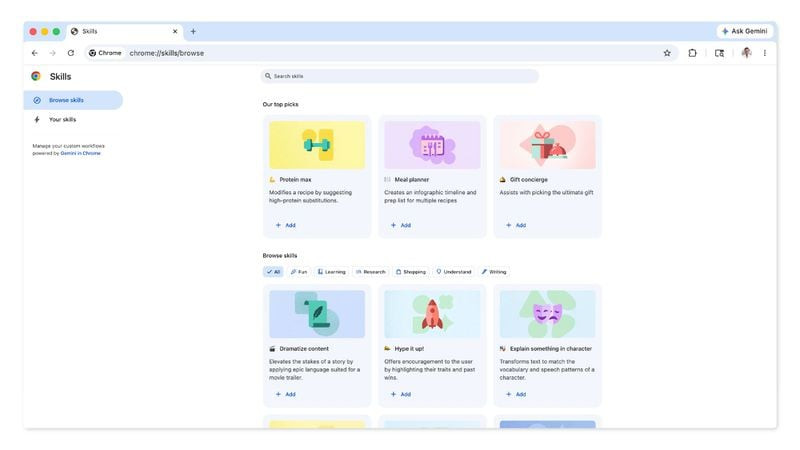
Imagine creating a useful prompt for Gemini in Chrome. You can now save it as a "Skill" and access it with a single click later. For instance, if you are shopping for skincare products and ask Gemini about a product's ingredients, you can save that question as a "Skill". This allows you to reuse it without needing to re-type the entire prompt.
This feature transforms your AI interactions into repeatable, accessible tools.
Google shared several examples of how testers are already leveraging this capability across different categories:
- Health & Wellness: Quickly calculate protein macros for any recipe.
- Shopping: Generate side-by-side specification comparisons across multiple tabs.
- Productivity: Scan lengthy documents for important information.
Saving a "Skill" is straightforward. You do it directly from Chrome's chat history, located in the side panel when Gemini is enabled. To recall it, simply type a forward slash (/) followed by the "Skill" name or click on the plus sign (+). The selected "Skill" will run on the page you are currently viewing, and even across other selected tabs.
Furthermore, Google is debuting this feature with a library of pre-written "Skills". These cover common tasks and workflows, such as viewing ingredients, finding a gift for someone, or making substitutions in a recipe. These pre-prepared "Skills" are fully customizable, adapting to your specific needs.
When using a "Skill" prompt, Gemini will confirm before taking actions like adding an event to the calendar or sending an email. This is similar to other Gemini actions in Chrome, always ensuring your control. "Skills" are rolling out for Gemini in the desktop version of Chrome, provided the browser's language is set to U.S. English. Get ready for a much smarter and more personalized browsing experience!
Article topics
Related articles

Windows Drops NTLM: Microsoft Boosts Security with Kerberos
Microsoft is taking a crucial step to bolster security in Windows 11, announcing the deprecation of NTLM, its oldest authentication protocol, in favor of Kerberos.
Google Launches Gemma 4 12B: Local AI for Your Laptop with 16GB RAM
Google's new artificial intelligence model aims to democratize access to generative AI, allowing it to run on average consumer computers.

Nvidia Challenges Intel and AMD with RTX Spark Superchip for PCs
Nvidia introduced RTX Spark, a processor promising to bring advanced artificial intelligence directly to your PC, without cloud dependence, and boost gaming to unprecedented levels on conventional machines.
Latest news
View all
Stuntman Hollywood: Returns After 19 Years to PS5, Xbox Series, and PC
The iconic action and vehicular stunt franchise makes its comeback courtesy of Saber Interactive, promising a dose of nostalgia and adrenaline for the new generation.

NASA's Maven Mars Orbiter Declared Out of Service After Six Months of Silence
Following an anomaly that disrupted its orbit and depleted its batteries, the Maven spacecraft, vital for understanding Mars' atmosphere, has ended its active mission. Its scientific data remains an invaluable legacy.

NASA Reveals New Path for Earth's Essential Life Elements
A recent study, published in Science Advances, uncovers how early Earth may have received phosphorus and nitrogen, highlighting Jupiter's critical role.
Comments (0)
No comments yet. Be the first!
Leave a comment