
HDR on Your Mobile: The Key to Stunning Photos in Any Condition
Discover what HDR is in mobile photography, how this powerful feature works, and learn to use it to capture images with exceptional detail in highlights and shadows, transforming your everyday photos into visual masterpieces.
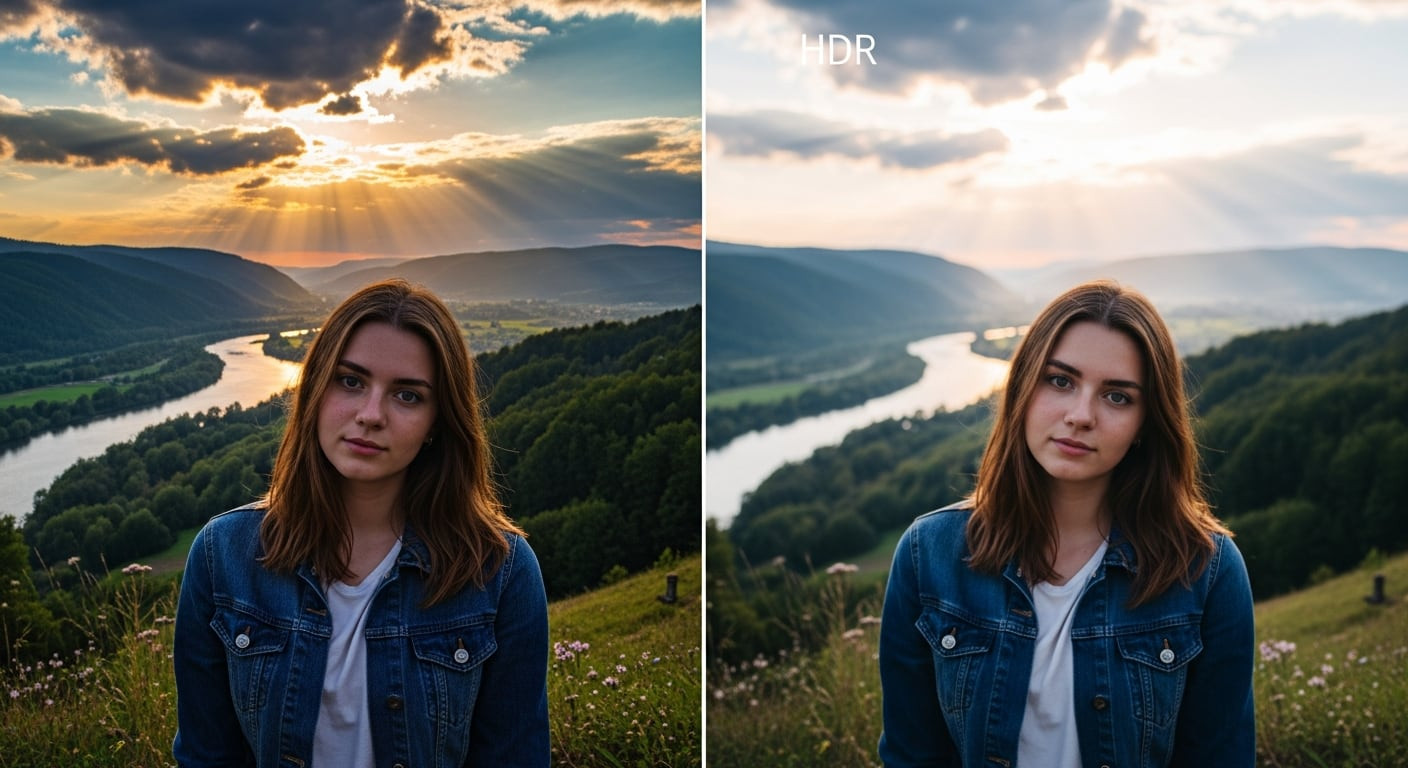
Mobile photography has revolutionized how we capture and share moments, turning our smartphones into increasingly sophisticated cameras. In this context, the term HDR has gained considerable prominence, often surrounded by myths and misunderstandings. Far from being a simple filter to "even out" light, HDR (High Dynamic Range) is an advanced function designed to overcome one of the inherent limitations of camera sensors: their limited ability to simultaneously record details in both the brightest and darkest areas of a scene. Understanding its true purpose and knowing when and how to apply it can significantly elevate the quality of your photographs, allowing you to capture reality with astonishing visual fidelity.
What is HDR and How Does it Work on Your Mobile?
Essentially, HDR seeks to emulate the extraordinary ability of the human eye to perceive a vast spectrum of light, from the deepest shadows to the most intense highlights, without losing detail in any of them. Camera sensors, by their nature, have a much narrower dynamic range. This means that in a high-contrast scene (for example, a landscape with a very bright sky and a shadowy foreground), the camera traditionally has to choose: expose correctly for the sky and leave the foreground underexposed and dark, or expose for the foreground and "blow out" the details of the sky. HDR solves this dilemma. When you activate this function on your smartphone, the device doesn't take one, but several photographs of the same scene in rapid succession, each with a different exposure: one underexposed to capture highlight details, another overexposed for shadows, and one or more with intermediate exposures.
Subsequently, the phone's powerful image processing algorithms spring into action. These algorithms analyze the multiple shots and intelligently merge them into a single final image. The result is a photograph that combines the best of each exposure, revealing rich details in both the brightest areas (like clouds in a bright sky) and the darkest ones (like the details of a building in shadow). It's crucial to understand that HDR doesn't aim to eliminate contrast, but rather to manage it intelligently to preserve visual information across the entire tonal range, offering an image that much more closely resembles human visual perception and often appears more "realistic" and three-dimensional.
When and Where HDR Shines
HDR is an invaluable tool in specific situations where the contrast between light and shadow presents a challenge for the camera. One of the most common scenarios is landscape photography, especially at sunrise or sunset, where the sky can be dazzlingly bright while the terrain or foreground elements are in shadow. Here, HDR allows both the vibrant colors of the sky and the details of the landscape to be captured with clarity. Another ideal use is in backlit portraits, where the subject appears dark against a very bright background. With HDR, you can illuminate the subject's face without overexposing the background, achieving a perfect balance. It's also very useful indoors with bright windows, where the outside light can "blow out" the view if exposed for the interior, or leave the interior too dark if exposed for the exterior. In these cases, HDR rescues information from both areas, creating a more balanced and appealing image.
Limitations and When to Avoid HDR
Despite its advantages, HDR is not a universal solution, and there are situations where its use can be counterproductive. One of the main limitations arises when photographing moving objects. Since HDR combines multiple shots, any movement between them can result in ghosting or undesirable blur. Therefore, it's not recommended for action scenes or fast-moving subjects. It's also not ideal in low-light conditions or night photography, unless your phone has exceptional noise processing, as combining multiple exposures can amplify digital noise in the shadows. If your artistic intention is to create dramatic contrast and stark silhouettes, HDR will negate that effect by attempting to balance the exposure. Finally, in scenes with already highly saturated colors, HDR can soften or "flatten" those colors, diminishing their intensity and vibrancy, which might not be the desired effect.
Pro Tips for Mastering HDR on Your Smartphone
To get the most out of HDR, the key lies in control and evaluation. First, whenever possible, opt to activate HDR manually rather than blindly relying on auto mode. This allows you to decide when it's truly necessary. Before activating it, take a photo without HDR and another with it, and compare the results to understand the impact on that specific scene. Avoid overusing the HDR effect in post-editing; an overly aggressive HDR can make images look artificial or "washed out." A useful trick is to tap the screen to focus on a mid-exposure or slightly brighter area; this can help the HDR algorithm better interpret the scene. Additionally, keep your phone as stable as possible during capture, preferably using a tripod or resting it on a surface, to minimize the risk of blur. With the evolution of computational photography, many modern smartphones integrate HDR so intelligently that it often works in the background without you even realizing it, but understanding its principles will give you superior creative control.
In summary, HDR is a powerful tool that, when used judiciously, can transform your mobile photographs, allowing you to capture complex scenes with a richness of detail and tonal balance that were previously unattainable. It's not a magic wand for all situations, but by understanding its strengths and weaknesses, you can effectively integrate it into your photographic arsenal and take your images to the next level.
Article topics
Related articles

Windows Drops NTLM: Microsoft Boosts Security with Kerberos
Microsoft is taking a crucial step to bolster security in Windows 11, announcing the deprecation of NTLM, its oldest authentication protocol, in favor of Kerberos.

Chrome Bolsters Security with DBSC Against Cookie Theft
Google Chrome has rolled out a new DBSC feature, linking sessions to your hardware to protect accounts from credential theft attacks.

Roku's home screen gets an AI-powered refresh for 2026
Roku is rolling out a significant update to its main interface, promising a more personalized experience with integrated advertising.
Latest news
View all
Stuntman Hollywood: Returns After 19 Years to PS5, Xbox Series, and PC
The iconic action and vehicular stunt franchise makes its comeback courtesy of Saber Interactive, promising a dose of nostalgia and adrenaline for the new generation.

NASA's Maven Mars Orbiter Declared Out of Service After Six Months of Silence
Following an anomaly that disrupted its orbit and depleted its batteries, the Maven spacecraft, vital for understanding Mars' atmosphere, has ended its active mission. Its scientific data remains an invaluable legacy.

NASA Reveals New Path for Earth's Essential Life Elements
A recent study, published in Science Advances, uncovers how early Earth may have received phosphorus and nitrogen, highlighting Jupiter's critical role.
Comments (0)
No comments yet. Be the first!
Leave a comment